

Watch Ring cameras on Apple TV
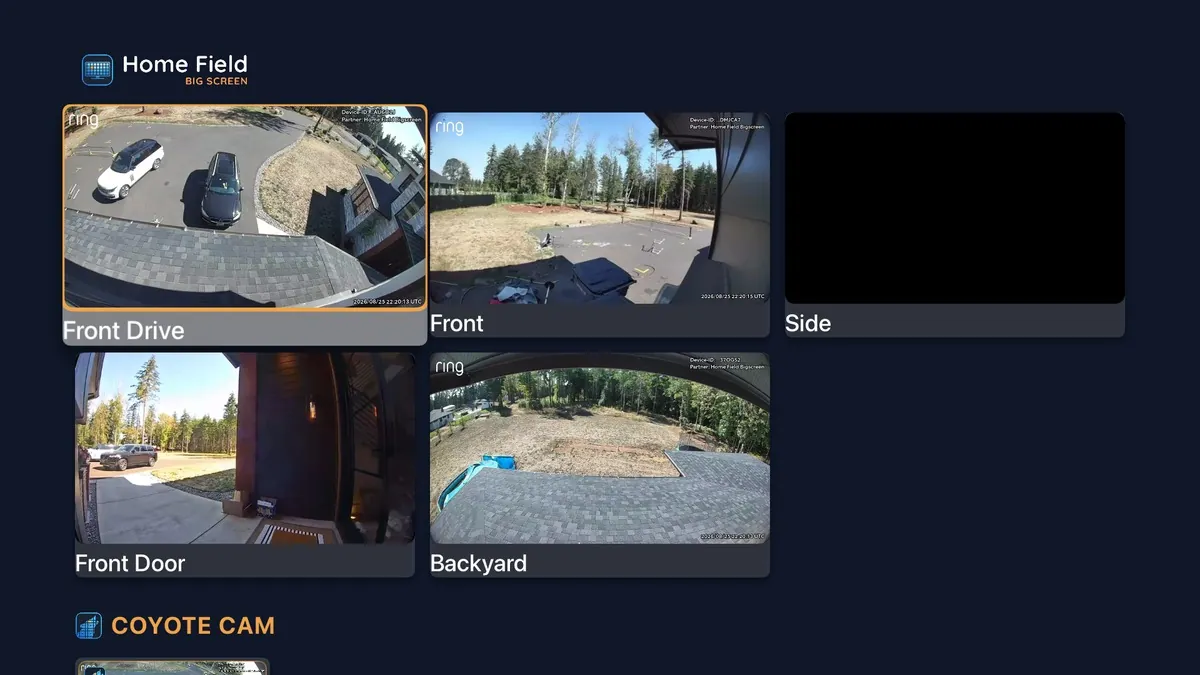
Ring owners have asked for an Apple TV app for years. Home Field Big Screen is one: every Ring camera and doorbell live in one grid on your Apple TV, and any camera full screen with sound.
Set it up in three steps
- 1In the Ring app, add Home Field Big Screen from the Ring Appstore and choose your cameras. See it step by step.
- 2Install Home Field Big Screen from the App Store on your Apple TV HD or Apple TV 4K, tvOS 17 or later.
- 3Open it. The TV shows a short code. Enter the code at homefield.tv/pair on your phone or computer, and your cameras come up.
Questions
Does Ring have an app for Apple TV?
No. Ring doesn't make an app for Apple TV. Home Field Big Screen is a third-party app, sold in the Ring Appstore, that puts your Ring cameras on Apple TV.
Can I see all my Ring cameras at once on Apple TV?
Yes. Every camera you choose comes up live in one grid. Select a camera to open it full screen with sound, and go back to the grid.
What does it cost?
$1.99 a month per camera, with a free trial, billed through your Ring account. Cancel any time in the Ring app.
What do I need?
A Ring account with cameras or doorbells that support Live View, and a Ring subscription.
Does the TV get my Ring password?
No. You pair the TV with a short code. The TV never holds your Ring password, and you can remove a paired TV from app.homefield.tv at any time.
Is the video recorded?
No. Live video goes from Ring straight to your screen and is never recorded or stored by Home Field.
Big Screen on another screen: Any TV · Fire TV · Roku · Google TV · Computer. Questions? Email support@homefield.tv.
Home Field is a third-party app and is not affiliated with, endorsed by, or sponsored by Ring, Amazon, Apple, Google, or Roku.